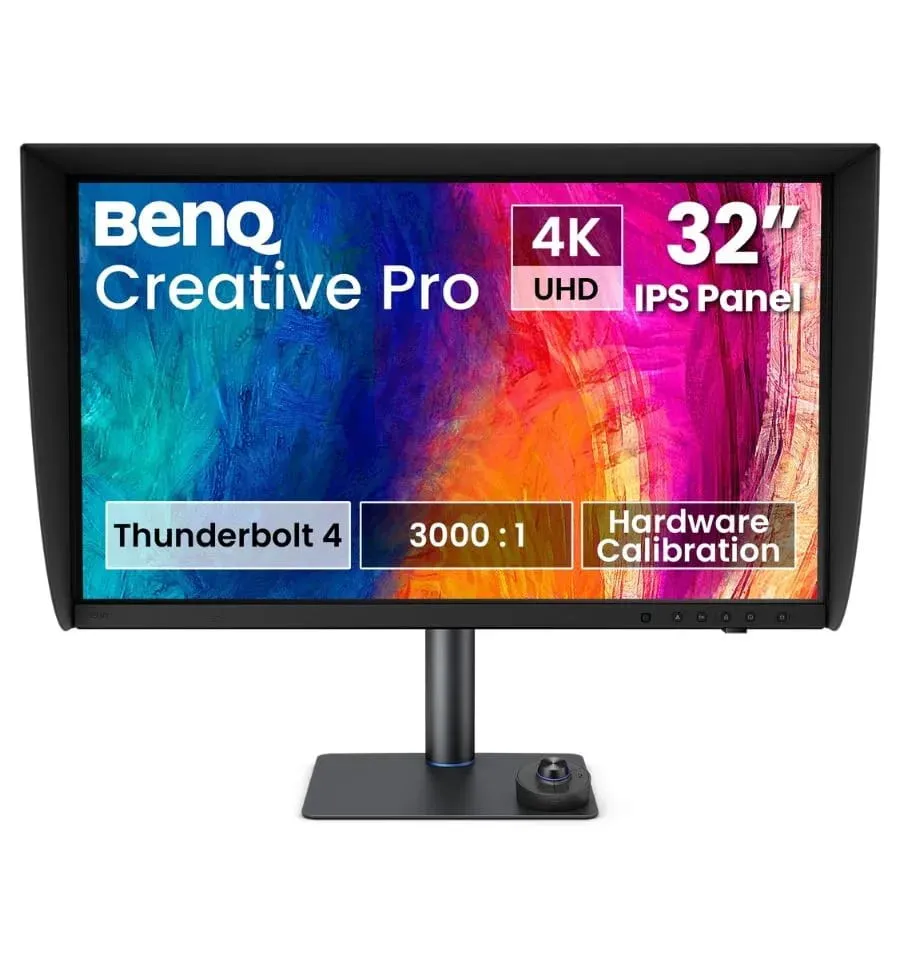
BenQ Creative Pro PV3250U 32 inch Professional 4K Monitor
On demand - delivery time 10 to 15 days (may vary depending on availability)
The BenQ Creative Pro PV3250U is a 32-inch professional 4K UHD monitor designed for colour grading, post-production and advanced video editing. It stands out for its native 3000:1 contrast ratio, hardware calibration with a 16-bit 3D LUT, Delta E accuracy of 1 or less and VESA DisplayHDR 600 certification. It also features Thunderbolt 4 with 96 W power delivery, an integrated KVM switch, a magnetic shading hood and an ESS DAC for audio monitoring. Available at Galaxy Andorra, with shipping to Spain, France and Portugal
Key specifications of the BenQ Creative Pro PV3250U
| Feature | Details |
|---|---|
| Panel | 31.5-inch IPS, 4K UHD, native 3000:1 contrast ratio |
| Color coverage | 99% DCI-P3 and Display P3, 100% sRGB and 100% Rec.709 |
| Calibration | Hardware calibration with 16-bit 3D LUT, Delta E of 1 or less |
| Brightness and HDR | 450 nits typical and 600 nits peak, with VESA DisplayHDR 600 |
| Connectivity | Thunderbolt 4 with 96 W power delivery, HDMI 2.1 and DisplayPort 1.4 |
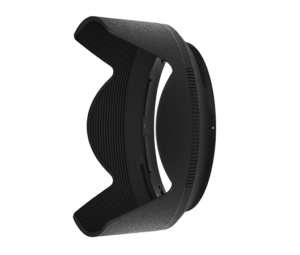
| Included | Magnetic shading hood and wireless Hotkey Puck G4 |
- Envío gratuito en Andorra a partir de 99 €
- Garantía oficial de distribuidor autorizado
- Devolución sin complicaciones en 14 días
Description
Key information about the BenQ Creative Pro PV3250U before you buy it
The BenQ Creative Pro PV3250U solves the biggest problem in color grading: the rendering of dark areas. Its native contrast ratio of 3000:1, three times that of a conventional IPS panel, achieves black levels of 0.03 nits under Rec.709 conditions.
This data exceeds Grade 1 requirements for SDR and allows for the preservation of texture and tonal separation in the shadows. Dark-Tone Clarity technology prevents the black crush effect, meaning that dark tones don't blend into a flat black, resulting in the loss of information present in the original material.
The calibration is hardware-based, using a 16-bit 3D LUT that maps approximately 5,000 RGB reference points across the entire color space, correcting hue, saturation, and gamut relationships. The profile is stored on the monitor itself, so the color remains consistent regardless of the connected computer.
In terms of brightness, it delivers a typical 450 nits with peaks of 600 nits in HDR, is VESA DisplayHDR 600 certified, and supports HDR10 and Hybrid Log-Gamma. It offers 99% coverage of DCI-P3 and DisplayP3, and 100% of sRGB and Rec.709.
Inspection tools for quality control and review
Shadow Check mode enhances shadow areas while maintaining the brightness of highlights, revealing hidden detail without clipping or altering the overall tonal balance. It's the tool for detecting cleaning flaws, compositional artifacts, and finishing inconsistencies during review.
Integrated markers offer overlays in various aspect ratios, providing a stable visual reference when the same content is delivered to different platforms. And the Area Zoom feature lets you zoom in on any area to verify focus accuracy and check fine details.
The monitor incorporates shortcut function keys to access essential controls without navigating through menus, with indicator lighting that automatically dims after use so as not to distract during review.
The wireless Hotkey Puck G4 adds three customizable keys and a rotary dial for brightness, contrast, and volume, with up to 30 different profiles, designed for studios where several monitors coexist and interference between controllers must be avoided.
Connectivity and studio audio
The Thunderbolt 4 port transmits video and data at up to 40 Gbps with 96W of charging over a single cable—enough to power a demanding work laptop. It supports one 8K monitor or two 4K monitors and is fully compatible with USB-C.
The Daisy Chain feature allows you to connect two 4K monitors in series. It's worth noting that the base versions of the Apple Silicon M1 and M2 chips don't natively support multiple external monitors, so this feature is limited to the Pro, Max, and Ultra variants.
The integrated KVM controls multiple computers with a single keyboard and mouse set, whether it's a Mac Studio, a PC, or a MacBook Pro, reducing cable clutter in a post-production workstation.
It also incorporates an integrated ESS DAC compatible with high-impedance headphones up to 300 ohms, allowing for detailed audio monitoring without the need for an external amplifier. This is a rare feature in a monitor and directly useful when reviewing audio material.
PV3250U versus PD2732U
Both belong to BenQ's Creative Pro range, but they correspond to different stages of the workflow.
| Feature | PV3250U | PD2732U |
|---|---|---|
| Size | 31.5 inches | 27 inches |
| Calibration | By hardware with 16-bit 3D LUT stored in the monitor | Via software with AQCOLOR Pilot |
| Color accuracy | Delta E less than or equal to 1 | Delta E less than 2 |
| Native contrast | 3000:1, with 0.03 nits blacks in Rec.709 | Conventional IPS Panel |
| Featured color space | 99% DCI-P3, video oriented | 99% Adobe RGB, print-oriented |
| HDR | VESA DisplayHDR 600, 450 typical and 600 peak nits | Compatible with HDR10 and HLG |
| Thunderbolt 4 | 96W charging | 90W charging |
| Inspection tools | Shadow Check, Markers and Area Zoom | Not available |
| Included extras | Magnetic visor, DAC ESS and Hotkey Puck G4 | Hotkey Puck G3 |
If your work involves color grading, post-production, or video quality control, the PV3250U provides the hardware calibration and shadow reading that workflow demands. If your work involves photography, graphic design, and print delivery, the BenQ Creative Pro PD2732U better covers that area with its 99% Adobe RGB coverage.
Is the BenQ Creative Pro PV3250U the monitor you need?
This monitor is designed for colorists and color graders. Its 3000:1 contrast ratio, 0.03 nits blacks, and hardware calibration allow you to make informed decisions about shadows, confident that what you see on screen matches the actual footage.
It also fits perfectly as a monitor for video editing and post-production, where inspection tools, aspect ratio markers and the integrated DAC reduce the need for auxiliary equipment on the workstation.
And it works as a reference monitor for studios that work with Macs, thanks to M-book mode, color synchronization with iPhone and iPad, and the KVM that allows switching between Mac Studio, PC, and laptop from the same workstation.
When to consider other options
If your primary work is photography for print, you need Adobe RGB coverage, not DCI-P3, so the PD2732U is a better fit and also a more cost-effective option. If your workflow is web design and digital content creation without professional video output, many of this model's features will be unusable. And if you need reference-grade HDR mastering with local dimming, that segment belongs to a different category of monitors.
Opinion of the Galaxy Andorra team
At Galaxy Andorra , with a physical store in Andorra and over 15 years of experience in photography and video, the difference we always explain at the counter between this model and the PD2732U isn't the size, but where the calibration is stored. Here, the profile lives within the monitor, so you can switch computers and the color won't change.
What customers who work with video value most is shadow performance. A 3000:1 contrast ratio on an IPS panel is unusual, and in practice, it means being able to judge a dark scene without having to increase the brightness to guess what's in it.
Two practical points. The magnetic sunshade is included and it's worth mounting from day one, because ambient light distorts shadow perception more than people realize. And if you work with high-impedance studio headphones, the integrated DAC saves you from needing an external amplifier on your desk.
Technical specifications of the BenQ Creative Pro PV3250U
| Specification | Detail |
|---|---|
| Panel type | 31.5-inch IPS |
| Resolution | 4K UHD, with a refresh rate of up to 120 Hz |
| Native contrast | 3000:1, with 0.03 nits blacks under Rec.709 conditions |
| Color spaces | 99% DCI-P3 and Display P3, 100% sRGB and 100% Rec.709 |
| Color accuracy | Delta E less than or equal to 1 |
| Calibration | Hardware-based with 16-bit 3D LUT and nearly 5,000 RGB reference points |
| Color certifications | Calman and ColourSpace |
| Uniformity | AQCOLOR with global full-panel calibration by microzones |
| Glow | 450 typical nits and 600 peak nits in HDR |
| HDR | VESA DisplayHDR 600, compatible with HDR10 and HLG |
| Thunderbolt 4 | Up to 40 Gbps with 96W charging, one 8K monitor or two 4K monitors |
| Other connections | HDMI 2.1 and DisplayPort 1.4 |
| KVM | Integrated, for multiple computers with a single keyboard and mouse |
| Audio | Integrated ESS DAC, compatible with headphones up to 300 ohms |
| Review tools | Shadow Check, aspect ratio markers, and Area Zoom |
| Features for Mac | M-book mode, iDevice color synchronization, and synchronized keyboard control |
| Software | Display Pilot 2 and AQCOLOR Pilot, compatible with standard calibrators |
| Physical control | Direct function keys and G4 Hotkey Puck with up to 30 profiles |
| Visor | One-piece magnetic, no tools or assembly required. |
| Ergonomics | 115 mm height, tilt from -5° to 20°, side swivel and 90° pivot |
Why buy the BenQ Creative Pro PV3250U at Galaxy Andorra?
Galaxy Andorra has a team specializing in color workflow that helps you decide between hardware or software calibration depending on your delivery type, and integrate the monitor with your current equipment.
Check availability and current pricing for the BenQ Creative Pro PV3250U in our store. We ship to Spain, France, and Portugal with tracking, and we're here to answer your technical questions before and after your purchase.
Frequently asked questions about the BenQ Creative Pro PV3250U
What advantage does the PV3250U's hardware calibration offer?
In the BenQ Creative Pro PV3250U, the color profile is stored in a 16-bit 3D LUT within the monitor itself. This means that color fidelity is maintained when switching computers, regardless of the operating system or the profile installed on each machine.
What is black crush and how does this monitor prevent it?
Black crush occurs when dark tones blend into a flat black, losing detail in the material. The BenQ Creative Pro PV3250U prevents this with its 3000:1 native contrast ratio, 0.03 nits blacks in Rec.709, and Dark-Tone Clarity technology.
What is Shadow Check mode used for?
The BenQ Creative Pro PV3250U 's Shadow Check mode enhances shadow areas while maintaining the brightness of highlights, allowing you to locate cleaning defects, composition artifacts, and finish inconsistencies during quality control.
Can I use studio headphones directly with the PV3250U?
The BenQ Creative Pro PV3250U integrates an ESS DAC compatible with high-impedance headphones up to 300 ohms, so you can monitor audio in detail without the need for an external amplifier.
What is the difference between the PV3250U and the PD2732U?
The BenQ Creative Pro PV3250U is a color grading monitor with hardware calibration, a 3000:1 contrast ratio, and shadow inspection tools. The PD2732U is a creative monitor with 99% Adobe RGB coverage, geared towards photography, design, and print delivery.
Reviews
Sé el primero en opinar
Si ya lo tienes, cuéntanos qué tal. A quien esté dudando le ayuda mucho.