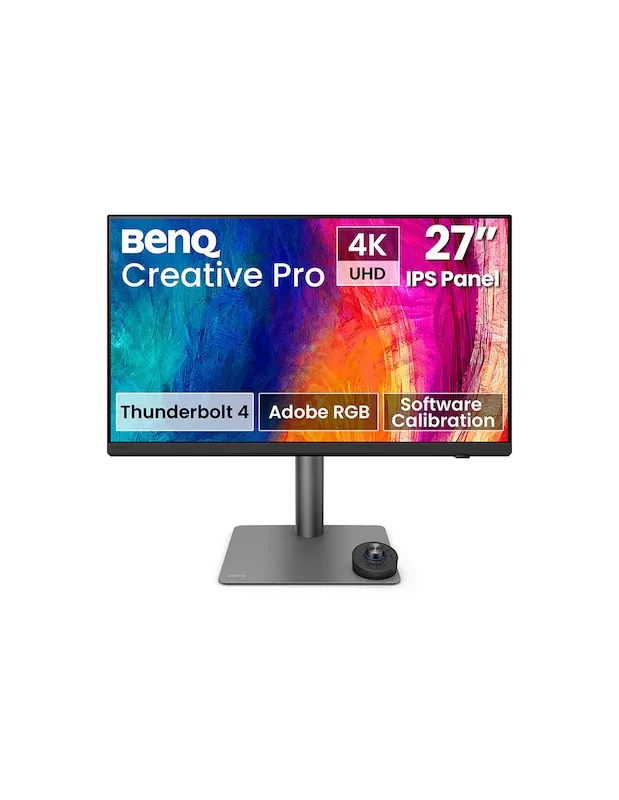
BenQ Creative Pro PD2732U 27 Inch Professional 4K Monitor
On demand - delivery time 10 to 15 days (May vary depending on availability)
The BenQ Creative Pro PD2732U is a 27-inch professional 4K UHD monitor designed for photography, graphic design and video editing. It covers 99% Adobe RGB, 99% DCI-P3 and 100% sRGB and Rec.709, with factory calibration and Delta E accuracy below 2. It also features Thunderbolt 4 with 90 W power delivery, an integrated KVM switch and a Nano Matte Black anti-glare panel. Available at Galaxy Andorra, with shipping to Spain, France and Portugal.
Key specifications of the BenQ Creative Pro PD2732U
| Feature | Details |
|---|---|
| Panel | 27-inch IPS, 3840 × 2160 at 60 Hz, 163 ppi |
| Color coverage | 99% Adobe RGB, 99% DCI-P3, 100% sRGB and 100% Rec.709 |
| Accuracy | Delta E below 2, factory calibrated |
| Connectivity | Thunderbolt 4 with 90 W power delivery, HDMI 2.1, DisplayPort 1.4 and USB hub |
| Finish | Nano Matte Black anti-glare panel |
| Included | Wireless Hotkey Puck G3 |
- Envío gratuito en Andorra a partir de 99 €
- Garantía oficial de distribuidor autorizado
- Devolución sin complicaciones en 14 días
Description
Key information about the BenQ Creative Pro PD2732U before you buy it
The BenQ Creative Pro PD2732U features a 27-inch IPS panel with a resolution of 3840 x 2160 at 60 Hz and a density of 163 pixels per inch, sufficient to review details at actual size without needing to enlarge the image.
Its 99% Adobe RGB coverage is what sets it apart from an office monitor. The sRGB color space falls short for print work because it clips blues and greens and flattens subtle gradients, something that isn't noticeable on screen but is evident in the printed result.
It comes factory calibrated with a Delta E accuracy of less than 2 and has external certifications including Pantone Validated, Pantone SkinTone, and Calman Verified. SkinTone validation is especially relevant for portrait photography, as it verifies the accurate reproduction of skin tones.
AQCOLOR Uniformity technology corrects micro-zones across the entire panel to ensure consistent brightness and color across the center and edges. Without this correction, the same image can appear different depending on where you view it on the screen.
A single cable for connecting and charging
The Thunderbolt 4 port transmits video and data at up to 40 Gbps and delivers 90W of power through the same cable, so your laptop stays connected and charging without any additional cables. It is fully compatible with USB-C.
It also supports daisy chaining to connect a second 4K monitor, useful in workflows with separate timelines and previews. It's worth noting that the base Apple Silicon M1 and M2 chips don't natively support multiple monitors, so this feature is reserved for the Pro, Max, and Ultra variants.
The integrated KVM switch allows you to control two computers, such as a Mac and a PC, with the same keyboard and mouse. Connectivity is rounded out by HDMI 2.1, DisplayPort 1.4, and a USB hub.
Designed to work with Apple equipment
M-book mode replicates the color profile of the MacBook Pro, so that the image on the laptop and the external monitor match without visual discrepancies when moving a window from one screen to another.
iDevice color synchronization allows you to preview how your work will look on iPhone and iPad screens before exporting, which is directly useful for anyone delivering content intended for mobile devices.
On macOS, keyboard control synchronizes both screens: pressing the brightness or volume key adjusts both the laptop and the monitor simultaneously, without having to go into separate menus.
Physical control and ease of use
The monitor includes the Hotkey Puck G3, a wireless remote with a rotary dial and three customizable keys. It allows you to change color modes, switch inputs, activate the KVM switch, or adjust brightness, contrast, and volume without opening the on-screen menu.
The Nano Matte Black panel reduces ambient reflections without sacrificing contrast or black levels, something that conventional anti-reflective coatings often compromise. This also translates to less eye strain during long workdays.
The ergonomic stand offers 115mm of height adjustment, tilt from -5° to 20°, 15° side swivel to each side and 90° pivot for working in vertical format, practical when laying out pages or reviewing portrait photography.
The free Display Pilot 2 software lets you organize features like ICCsync, color modes and desktop splitting, and the AQCOLOR Pilot software makes it easy to recalibrate the display to maintain accuracy over time.
Is the BenQ Creative Pro PD2732U the monitor you need?
This monitor is perfectly suited as a monitor for photography intended for printing. Its 99% Adobe RGB coverage and Pantone SkinTone validation are exactly what's needed when the final output comes from a printer, not a screen.
It also works very well as a monitor for video editing, thanks to 100% Rec.709 and 99% DCI-P3 coverage, and as a monitor for graphic design and multi-platform work, where the same project ends up on the web, on social media, and on paper.
And it's a solid choice as a monitor for Mac, whether as an external display for a MacBook Pro in M-book mode, or as a shared station between a Mac and a PC thanks to the integrated KVM.
When to consider other options
A 60Hz refresh rate is suitable for creative work, but if you're also looking for a gaming monitor with a high refresh rate, this isn't the right choice. If your work is limited to web design and digital content that isn't intended for print, an sRGB monitor will meet your needs with a smaller investment. And if you require reference-quality HDR mastering with zone control, that segment belongs to a different category and price point.
Opinion of the Galaxy Andorra team
At Galaxy Andorra , with a physical store in Andorra and more than 15 years advising photographers, the most convincing argument for this monitor is not usually the Adobe RGB number, but what it avoids: repeating jobs because the printed copy does not resemble what was seen on screen.
The most appreciated feature in daily use is the Hotkey Puck. Being able to switch from Adobe RGB to sRGB with a gesture, to check how an image will look on the web before submitting it, is one of those things that seems minor until you use it every day.
Two practical tips. If you work with a MacBook Pro, this monitor provides both screen and charging with a single Thunderbolt cable, so consider whether it's worth it compared to using a separate dock. And although it comes factory calibrated, recalibrate it periodically with AQCOLOR Pilot: the accuracy of any panel will degrade with use.
Technical specifications of the BenQ Creative Pro PD2732U
| Specification | Detail |
|---|---|
| Panel type | 27-inch IPS display with Nano Matte Black finish |
| Resolution | 3840 x 2160 (4K UHD) at 60 Hz |
| Pixel density | 163 dots per inch |
| Color spaces | 99% Adobe RGB, 99% DCI-P3 and Display P3, 100% sRGB and 100% Rec.709 |
| Color accuracy | Delta E less than 2, with factory calibration |
| Certifications | Pantone Validated, Pantone SkinTone Validated and Calman Verified |
| Uniformity | AQCOLOR Uniformity with microzone correction |
| Dynamic range | Compatible with HDR10 and HLG |
| Thunderbolt 4 | Video and data up to 40 Gbps with 90W charging, compatible with USB-C |
| Daisy Chain | Chaining a second 4K monitor |
| Other connections | HDMI 2.1, DisplayPort 1.4 and USB port hub |
| KVM | Integrated, for two computers with a single keyboard and mouse |
| Features for Mac | M-book mode, iDevice color synchronization, and synchronized keyboard control |
| Software | Display Pilot 2 and AQCOLOR Pilot for calibration |
| Physical control | Hotkey Puck G3 wireless with dial and three customizable keys |
| Height adjustment | 115 mm |
| Tilt and swivel | Tilt from -5° to 20° and lateral rotation of 15° to each side |
| Pivot | 90° for vertical use |
Why buy the BenQ Creative Pro PD2732U at Galaxy Andorra?
Galaxy Andorra has a team specializing in color workflow that helps you decide if you need Adobe RGB coverage based on your delivery type, and configure the monitor with your current equipment.
Check availability and current pricing for the BenQ Creative Pro PD2732U in our store. We ship to Spain, France, and Portugal with tracking, and we're here to answer your technical questions before and after your purchase.
Frequently Asked Questions about the BenQ Creative Pro PD2732U
Why do I need Adobe RGB if I work with sRGB?
The sRGB color space was designed for digital viewing and cuts off some blues and greens, as well as flattening subtle gradations. If your work ends up in print, the BenQ Creative Pro PD2732U 's 99% Adobe RGB coverage preserves those tones and reduces surprises between screen and paper.
Can I connect a MacBook to the PD2732U with a single cable?
The BenQ Creative Pro PD2732U incorporates Thunderbolt 4, which transmits video and data at up to 40 Gbps and delivers 90W of charging through the same cable, so the laptop remains connected and charging without additional accessories.
Can the PD2732U be used to control two computers simultaneously?
The integrated KVM switch of the BenQ Creative Pro PD2732U allows you to control two computers, for example a Mac and a PC, with the same keyboard and mouse, switching between them from the monitor itself or with the Hotkey Puck.
Does the BenQ Creative Pro PD2732U come factory calibrated?
The BenQ Creative Pro PD2732U comes factory calibrated with a Delta E accuracy of less than 2 and is Pantone Validated, Pantone SkinTone, and Calman Verified certified. To maintain this accuracy over time, it can be recalibrated using the free AQCOLOR Pilot software.
Can I use the PD2732U vertically?
The BenQ Creative Pro PD2732U stand allows you to pivot the screen 90° for vertical viewing, plus 115mm of height adjustment, -5° to 20° tilt, and 15° side swivel.
Reviews
Sé el primero en opinar
Si ya lo tienes, cuéntanos qué tal. A quien esté dudando le ayuda mucho.